Desk companion for Claude Code

Your Claude Code usage, alive on your desk

ClauLi is a desk accessory that shows a living robot-eye character reacting to your Claude Code activity. The character's colour smoothly shifts from cyan → amber → red as your usage climbs, and its mood changes with your work rhythm. Cross-platform daemon, BLE, web configurator.

Try it — drag your usage 10%
CALM the eyes & bars recolour with your real usage
★100% free 🔌ESP32 + display device 📶Controlled over Bluetooth 🚫No phone app
ClauLi's eyes reacting on the real device — cyan to amber to red by usage
13:37
real device footage · clock + ribbon layout · colour tracks usage
3
Characters
8
Layouts
29
Animations
8
Clock styles
…across 4 device states · 16 eye forms · 11 motions · a colour gradient editor — all over Bluetooth
It's a device, not an app

A tiny ESP32 + display that lives on your desk

ClauLi is real hardware — a small ESP32 board with its own screen. A lightweight background helper on your computer streams your Claude Code usage to it over Bluetooth Low Energy — nothing to install on your phone, no account, no cloud. Just a glowing companion on your desk. And the whole thing — firmware, daemon, web config — is completely free and open-source.

★Completely free 🔌ESP32 + display hardware 📶Bluetooth Low Energy control 📂Open-source on GitHub 🚫No phone app, no cloud
Three characters

Pick your hero — try it live

One firmware, three visual identities — click to swap.

Character
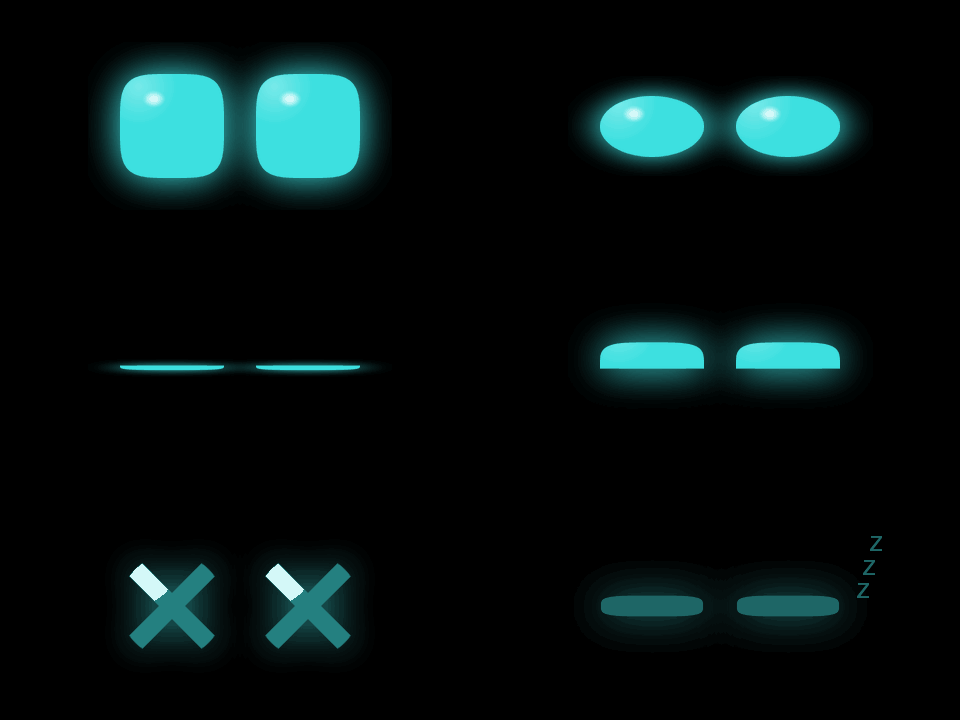
ClauLi Pixl Old-TV
Mood
Neutral Happy Love Sad Sleepy Angry

29 complex animations

A whole repertoire of moods

Scripted, keyframed mini-performances — pick which run per device state.

Yours to shape

Make it look exactly how you like

ClauLi's eyes on the real device — live footage
S 62% · W 38%
13:37
01 / CHARACTER

Three characters, one firmware

Switch the whole look in one tap. ClauLi — glossy squircle eyes; Pixl — retro dot-matrix; Old-TV — eyes behind CRT scanlines. They all share the same emotions and data — only the art style changes.

ClauLiPixlOld-TV + orientation
02 / LAYOUT

Eight ways to show your usage

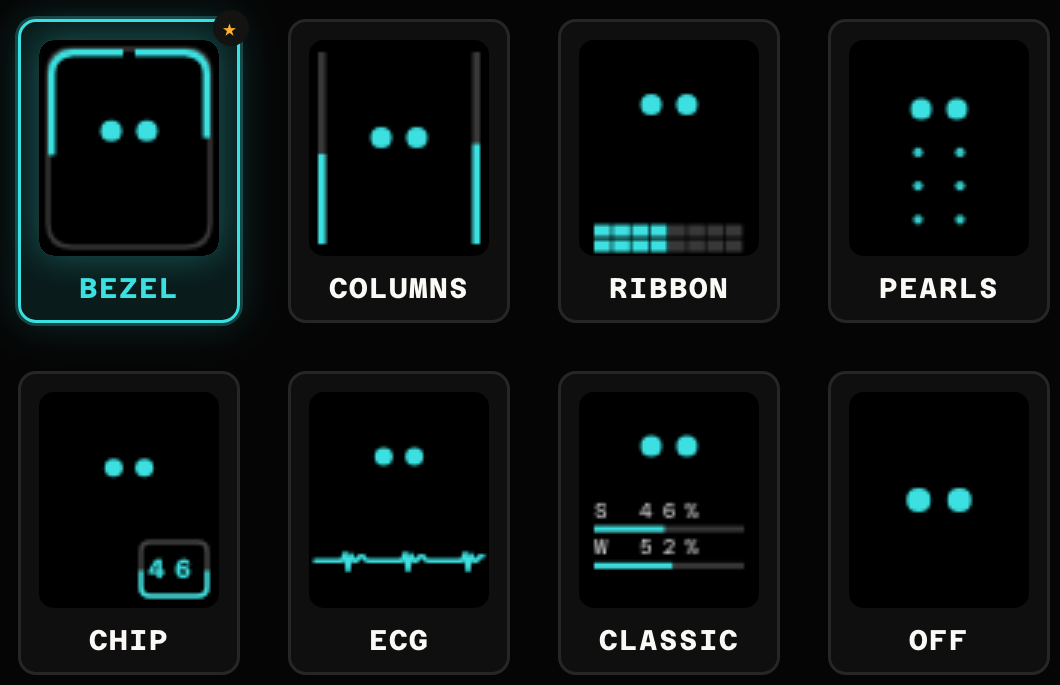
Pick how the session & weekly numbers sit around the eyes — from full-screen bars to a tiny corner chip, an ECG line, or nothing at all for a pure-eyes look.

BezelColumnsRibbonCorner chipECGTear pearlsClassicNone
03 / USAGE TEXT

The numbers, your way

Show session, weekly or both — as a %, a reset time, or both — placed top, middle or bottom, per layout. The colour tracks usage: cyan → amber → red as you approach your limit.

SessionWeeklyBoth%reset timetop / mid / bottom
04 / CLOCK

And an on-device clock

Top it off with a clock in seven type styles (Mono, Major Mono, Orbitron, Outline, Neon, Seconds, Bracket) with its own colour — or turn it off. Every change above is pushed live over Bluetooth — no reflash, no cable.

MonoOrbitronNeonOutlineSeconds+ colour
SCROLL TO EXPLORE ↓
On-device clock

Eight clock styles

Put a clock on the screen in any of eight type styles — with its own colour — or off.

13:37
Mono
13:37
Major Mono
13:37
Orbitron
13:37
Outline
13:37
Neon
13:37:42
Seconds
[13:37]
Bracket
13:37
Off
Eight layouts

Every way to show your usage

Pick how the session & weekly numbers sit around the eyes — full-screen bars, twin columns, a perimeter ring, a corner chip, an ECG line, droplet pearls, a classic readout, or nothing at all. These are the actual on-device renders.

All eight ClauLi layouts: Bezel, Columns, Ribbon, Pearls, Chip, ECG, Classic, Off — real device renders
01 Bezel02 Columns03 Ribbon04 Pearls 05 Chip06 ECG07 Classic08 Off
What it does

Everything you need, nothing you don't

Designed to be set up once and forgotten — just a glowing presence on your desk that quietly tells you how hard Claude is working.

Usage → colour

Colour that tracks usage

…

4 device states

A face for every state

…

Connected Connecting BLE off Token expired
Always alive

Living emotions

…

Wireless

BLE + OTA

…

No strings

Free & open

…

Everything else

The full spec

  • Cross-platform daemon — macOS, Linux & Windows; reads the Claude Code token, self-heals on rotation
  • Web configurator — localhost:8765, with a live device preview
  • Manual live-control — drive forms, colour & animations in real time
  • Timing sliders — how fast forms rotate & animations fire
  • Usage text — session / weekly / both, as % or reset-time, per layout
  • On-device clock — no RTC; timestamp synced over BLE each poll
  • Orientation — portrait or landscape
  • EN / RU — on the device and in the web UI
  • Staged editing — preview, then Apply / Reset / Defaults
  • Self-healing BLE — no pairing; rescans & reconnects automatically
Setup in minutes

How it works

Three steps from unboxed to living character on your desk.

01
Flash the firmware

Download the latest release, connect via USB, and flash with PlatformIO or the provided flash.sh script. One command, done.

02
Run the app

Download the prebuilt app from Releases and just run it — double-click ClauLi.app on macOS, or clauli --tray on Linux/Windows. It reads your Claude Code token automatically. Prefer source? scripts/run-daemon.sh sets up everything.

03
It just works

ClauLi connects over BLE, the character lights up with your real usage data, and mood changes as you code. Open localhost:8765 to customise.

Web configurator

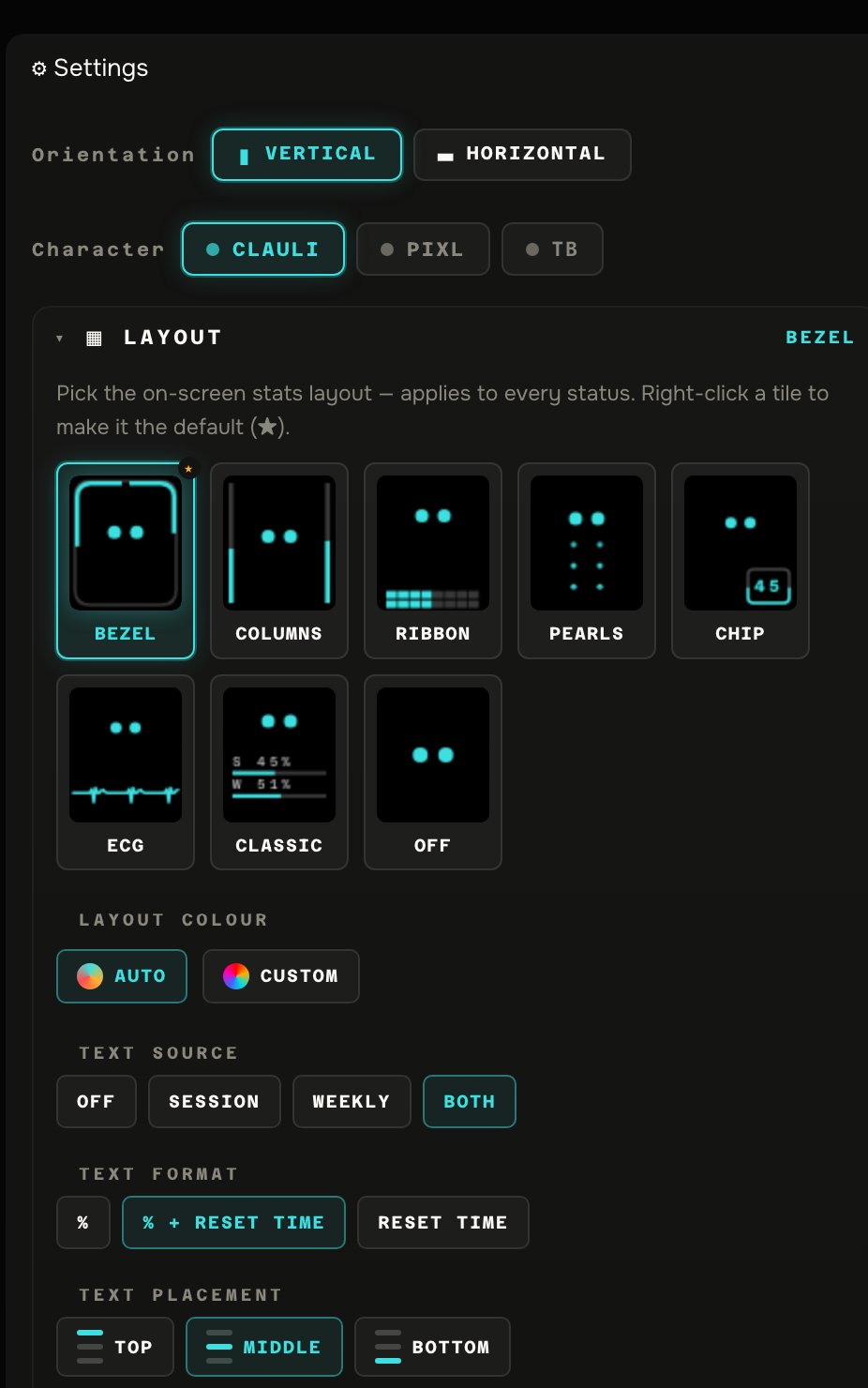
Tune everything from your browser

The daemon serves a local web UI at localhost:8765. Changes are applied instantly over BLE — no reflash needed. The device and the web UI stay in sync via WebSocket.

  • Character & orientation — ClauLi, Pixl or Old-TV, plus screen rotation
  • 8 layouts — Bezel, Columns, Ribbon, Corner chip, ECG, Tear pearls, Classic, or None (pure eyes)
  • Per-status visuals — for Connected / Connecting / BLE-off / Token-expired, pick rotating eye forms + motions or one looping complex animation (~30), with its own colour
  • Colour by usage — auto cyan → amber → red with custom thresholds, or a fixed colour
  • Clock — off or 7 type styles (Mono, Major Mono, Orbitron, Outline, Neon, Seconds, Bracket) + colour
  • Usage text — session / weekly / both, as % / reset-time / both, placed top, middle or bottom — per layout
  • Timing — how fast forms rotate and animations fire
  • Language & OTA — EN / RU on device, plus wireless firmware updates over Wi-Fi
  • Live preview & staging — see changes in a device preview, then Apply, Reset or restore Defaults
localhost:8765 LIVE
The real ClauLi web configurator — orientation, character, all eight layouts, layout colour and usage text
The real control surface — orientation, character, all 8 layouts, colour & usage text.